hello i am here today to not lose track of the art cheats i have discovered over the years. what i call art cheat is actually a cool filter/coloring style/way to shade/etc. that singlehandedly makes art like 20 times better
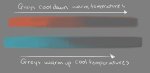
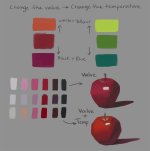
adding colors to grayscale paintings
foreshortening ( perspective )
clipping group (lines)
clipping group (colors)
that is all for today, do stay tuned as i am always hunting for cool shit like this
Tag: save
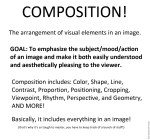
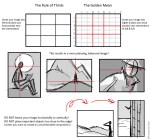
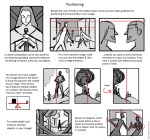
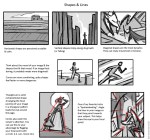
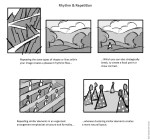
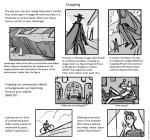
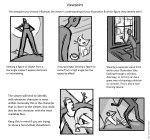
Today I gave my students a quick presentation on some of the basic considerations for composition, which I am now sharing with you! I’ve given them separate talks about color and tonal value/contrast, which are also super important compositional concerns. (I’ll be sharing those presentations too once I properly format them)
I personally love learning about different compositional techniques. It’s fun to think about the ways that the brain views & sorts images, and how we can trick it into feeling a certain way or looking at certain aspects of an image first! It’s easy to fall into compositional ruts (which I am also guilty of) because a lot of art gets by with mediocre, though serviceable, compositions. If you can generally understand what’s happening in an image then it’s generally fine. However, it’s the truly great compositions, where everything in the whole image has been considered and ‘clicks’ together, that bump up an illustration to a visual slam dunk. NC Wyeth is one of my favorite artists for this reason: his compositions are rock solid, varied based on the image’s intent, and always enhance the mood or action he is depicting.
For extra reading, some online compositional resources that I’ve found helpful or interesting include:
Creative Illustration by Andrew Loomis (download it for FREE. Such a great book all-around.)
Gurney Journey (check out the “Composition” tag, but really everything he posts is great)
The Schweitzer guide to spotting tangents
Cinemosaic (a blog by Lou Romano with some truly WONDERFUL compositions captured from various films)
Where to Put the Cow by Anita GriffinHappy composition-ing!
Attention ALL artists!
You sure have seen this post. It has spread like wildfire over the past few days so I doubt there is any artist out there who hasn’t seen it. But even if you didn’t, you should read on because I’m about to tell you a handy little thing that can help you to protect your art from such assholes as the anon who submitted this bullcrap, as well as art thieves in general.
The magic word is Metadata.
Metadata is like an invisible signature that is embeded into a file. It can contain all kinds of information, like Title, date, keywords for online seach engines, and copyright information. And the best thing is, since this information is “hidden” in the code of your picture, it’s hard to remove it.
There is a nice basic tutorial on how to add Metadata, or “additional file information” to your images in photoshop. It’s really, really easy so check it out!
“Adding Your Contact And Copyright Info To Your Photos With Photoshop” on PhotoshopEssentials.com
I’m not sure if you can do the same with any other art program. If you know how to do this in other programs / can confirm that it works the same way there, please tell me so I can add the information to this post.
Adding the Metadata will not stop idiots from taking and reposting your art. It also won’t make them stop editing out your signature. It WILL however, help you prove that you are the original artist whenever you have to.
Always remember my friends. You, the artist, are protected by law. No one has the right to take your intellectual property and hard work and repost, use or edit it without your permission. Ever.I usually don’t reblog these sort of things, but to my fellow artists out there. Your art is your art! I hope this helps anyone who comes across it.
 In cookie heckkie